
Accessibility breaks after Shopify changes. Catch regressions before customers do with BarrierFreeSite
BarrierFreeSite is a Shopify app created by Netkodo that helps e-commerce stores scan and monitor accessibility regressions caused by theme updates, app installs, page builder changes, content edits, and checkout tweaks.
TL;DR
BarrierFreeSite is a Shopify-first app for detecting accessibility issues and regressions after changes.
- Start with a free scan to get a baseline snapshot and the top issues.
- Upgrade to $19/month monitoring to get alerts and scan history as your store evolves.
Automated tools detect issues. Code fixes require remediation.

15%+ of internet users rely on accessible design

Accessibility improves Core Web Vitals and SEO structure

EAA (EU) compliance becomes mandatory in June 2025
Fast answers about BarrierFreeSite
What do I get first?
A free scan that highlights the most common accessibility issues and gives you a baseline snapshot.
Is a user assistance panel (assistive tools) enough?
No. Assistive tools can help users, but they do not fix accessibility issues in your code and they are not compliance on their own.
Who is this for?
Shopify stores that ship changes often and want to catch regressions before they impact customers. Shopify agencies can also use it across client stores.
What happens when automation isn’t enough?
Request an audit. If code fixes are needed, we scope remediation. After that, you can keep regressions under control with the Maintenance Program (post-audit only).

Built for Shopify
Shopify stores change constantly. Accessibility often breaks after updates not only during initial builds.
Common regression triggers include:
- theme updates and theme customizations
- installing/removing apps that inject UI (popups, sliders, sticky bars)
- page builders and dynamic sections
- campaign landing pages and promotional banners
- cart and checkout UX changes
Key fact: The highest-impact regressions are the ones that break core flows: navigation, product discovery, cart, and checkout.
Why accessibility breaks after changes and why monitoring matters
Accessibility doesn’t fail once. It fails repeatedly when a store ships changes.
A theme tweak can remove focus states. An app can add a modal that traps keyboard navigation. A new banner can break color contrast.
The most important thing is to treat accessibility like release quality:
Scan → ship changes → detect regressions → fix → verify → repeat.

How does BarrierFreeSite work?
Scan your Shopify store (FREE)
Run a scan to get a readiness snapshot and identify top issue patterns.
Typical findings include: missing alt text, low contrast, unclear link labels, form labeling issues, and keyboard navigation gaps.
Monitor changes & regressions ($19/month)
Monitoring keeps accessibility visible as your store evolves.
You get:
- scan history (baseline + progress over time)
- alerts when changes introduce regressions
- ongoing issue tracking that supports prioritization
Fix with experts when code changes are required (services)
When automation flags recurring problems or critical flows are impacted - request an audit and remediation.
Automated tools detect issues. Accessibility requires code-level remediation and re-testing.

What you get in the app?
BarrierFreeSite is designed to surface issues early and help you detect regressions after Shopify changes.
Monitoring
-
Tracks issues over time (scan history)

-
Flags changes that introduce regressions
-
Supports triage when something breaks after releases
Assistive tools
-
You can enable a user assistance panel to help visitors adjust the interface to their needs
Remember
Assistive tools help users, but they do not fix accessibility issues in your code. They are not compliance on their own.
Pricing (Shopify App plans)
Only two options inside the Shopify app.
 Plan
Plan
When automation is not enough
This is the next step when a scan or alert shows meaningful impact - especially in cart/checkout or key navigation.

Accessibility Audit (one-time)
A manual baseline of critical flows, with severity-based findings and a remediation plan.
Includes:
- Issues mapped to WCAG criteria (practical interpretation)
- Review of Shopify journeys: navigation, PDP, cart, checkout.
- Prioritized plan by impact and effort.
- Summary call with next steps

Remediation (custom scope)
We implement code-level fixes and verify results.
Includes:
- Fixes in theme/custom code where required.
- Verification notes and re-testing.
- Handover guidance for future changes.

Maintenance Program ($99/month)
Post Accessibility Audit only
What's included:
- Monitoring + scan history.
- Quarterly human review (regression control + priorities).
- Recommendations and a plan when something breaks.
What's not included:
- No fixes included in the monthly fee.
- No "unlimited support".
- Fixes are always scoped separately.
What you’ll receive
BarrierFreeSite isn't just legal protection. It creates business value for your business
Monitoring deliverables
- Scan history (baseline + trend).
- Alerts for regressions after changes issue tracking that supports prioritization.
Audit deliverables
- Severity-based issues mapped to WCAG criteria.
- Remediation plan prioritized by impact on key flows.
Remediation deliverables
- Implemented code fixes.
- Re-test notes after changes.

EU context (EAA)
Why monitoring matters for Shopify stores in the EU
For EU e-commerce, accessibility is increasingly a practical requirement. The European Accessibility Act (EAA) applies from 28 June 2025 and includes e-commerce.
BarrierFreeSite helps you build operational readiness by keeping accessibility measurable over time: scans, monitoring, history, and documented reactions to regressions.
Installation checklist

No theme editing, no breaking layout, no development hours required
How BarrierFreeSite work for our clients?


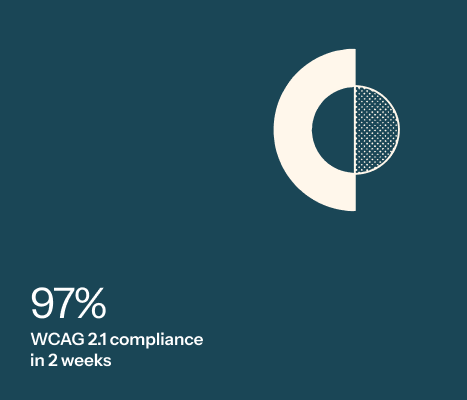
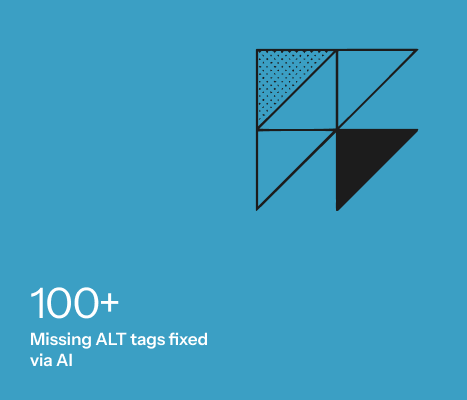
In Q1 2024, we deployed an early version of BarrierFreeSite on pelna-zycia.pl
FAQ
Do I need this if I already use ALT text on images?


Yes. ALT text is 1 of 50 WCAG criteria. Compliance includes forms, keyboard flow, color contrast, and much more.
We’re a small shop. Are we really included in the law?
Yes. ALT text is 1 of 50 WCAG criteria. Compliance includes forms, keyboard flow, color contrast, and much more.
What happens if I ignore this?
Yes. ALT text is 1 of 50 WCAG criteria. Compliance includes forms, keyboard flow, color contrast, and much more.
Is this plugin mobile-friendly?
Yes. ALT text is 1 of 50 WCAG criteria. Compliance includes forms, keyboard flow, color contrast, and much more.
Does it slow down my store?
Yes. ALT text is 1 of 50 WCAG criteria. Compliance includes forms, keyboard flow, color contrast, and much more.
Do I need a developer?
Yes. ALT text is 1 of 50 WCAG criteria. Compliance includes forms, keyboard flow, color contrast, and much more.
How often does it update?
Yes. ALT text is 1 of 50 WCAG criteria. Compliance includes forms, keyboard flow, color contrast, and much more.
Is it a one-time fee?
Yes. ALT text is 1 of 50 WCAG criteria. Compliance includes forms, keyboard flow, color contrast, and much more.
What if WCAG updates to 3.0?
Yes. ALT text is 1 of 50 WCAG criteria. Compliance includes forms, keyboard flow, color contrast, and much more.
BarrierFreeSite
Ready to catch accessibility regressions before customers do?